[UMT CARD UPDATE] Possible Issues and Solutions ★★★★★

📢 Latest update UMT[15-10-26] UMTv2/UMTPro UltimateMTK2 v3.9 - Motorola Fastboot Advance Method 15-10-26 18:33
✖ closed thread
Sticky: [UMT CARD UPDATE] Possible Issues and Solutions ★★★★★
10-05-25 12:09 #1
Administrator
Fast Unlocking
Join Date:
May 2025
Posts:
1,177
Thanks:
69
Reputation:
69 ★★☆☆☆
Trusted Member
[UMT CARD UPDATE] Possible Issues and Solutions ★★★★★
UMTv2 CARD UPDATE
ISSUES AND SOLUTION


Since Release of UMTv2 and Update of All Modules to UMTv2, many users are facing issues with Card Update.

Here is a guide to avoid issues while updating card.

We STRONGLY RECOMMEND you to read it properly, and follow.

Any post from lazy people, or people who DON'T WANT TO READ anything, will be simply deleted.


Point #1 :
You must only use Modules which has UMTv2 Card Updater.
Modules with old card updater will not work anymore.


Point #2 :
First release of UMTv2 had old card updater, which no longer works.
You must use only latest released Module, for example:
QcFire v1.2
GSM v4.2
UltimateMTK v1.0


Point #3 :
You can use any version / module, IF it has latest Updater integrated.
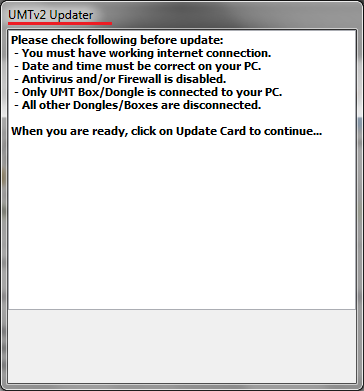
Current Updater is UMTv2 Updater.
If your module ask for Update Card, but Updater is older, you need to use Latest Module / Version which has UMTv2 Updater.


Screenshot of UMTv2 Updater:


Error Messages and Solution:

Error! Connection timeout
- Check your System's Date / Time. Also make sure Time Zone is correct. If you are in India, then your Time Zone must be set to Indian Standard Time, and then correct Date/Time.


Error! Unknown host.
- Use latest version of Module. You are using old version.


Error! Client not authorized.
- Use latest version of Module. You are using old version.


Please try again after 24 hrs
- You have exhausted 3 update counters within 24 hours. Please try after 24 hours.


Failed! Check internet connection.
- Your Internet connection is not working, or firewall etc. is blocking connection. Another possible reason could be your ISP blocking connection. In such case, you may need to connect via another ISP.


For All other Error Messages, you may contact us, with screenshot of UMTv2 Updater.


If you are facing some issue, which is not covered here, please read this Post from beginning again.


WE WILL DELETE ANY USELESS POST / THREAD IF USER HAS NOT FOLLOWED THIS POST.

NO SAME ERROR POST, WE WILL DELETE IT.


Br,
Ultimate Multi Tool

Join NCK Forum — it's freeAsk questions and get answers from experienced technicians
835 members · 0 solved problems · 6 posts this week
Register now
10-05-25 12:10 #2
Administrator
Fast Unlocking
Join Date:
May 2025
Posts:
1,177
Thanks:
69
Reputation:
69 ★★☆☆☆
Trusted Member
Quote:
Card Obsolete Error

My Solution is the following:


Hope I help users and not to be on any way going against any rule
  1. 1
First download Card Firmware Updater on Support but since I was unable to download it or even entering Support V2 I leave here a Download link for it

https://mega.nz/#!u4IWAI5b!rSomjbHILhptXgJJgLNjDtgU8INwG8JygGirPtyV_ls

After open Card Firmware Updater and even if software says no need for updating it as mine said and still got the error Update Firmware the same.

  1. 2
After That Open main UMT Software and upgrade until it shows
Quote:
Please restart software.
  1. 3
Restart Software and you are ready to go

This is my solution for those who havn't been able to access to support and download card firmware updater on Support Version 2

It worked at my two cards and after that support page already opens and your card is also capable of downloading Main Software or any other software


After step 1.1 support will be active if not use link mirrors for downloading main module I provide or team provides.

https://mega.nz/#F!CxISwQDD!2bPjuEtQe-ofqTrqwFUC1g
Join NCK Forum — it's free
  • ✔ Ask questions and get answers from experienced technicians
  • ✔ Download files and attachments
  • ✔ Follow official NCK, UMT and Avengers updates
  • ✔ Mark solutions and earn reputation
835 members · 0 solved problems · 6 posts this week
Register now