★★★★★ Post Here All Successfully Repaired Phones by Ultimate Multi Tool ★★★★★

📢 Latest update UMT[15-10-26] UMTv2/UMTPro UltimateMTK2 v3.9 - Motorola Fastboot Advance Method 15-10-26 18:33
Sticky: ★★★★★ Post Here All Successfully Repaired Phones by Ultimate Multi Tool ★★★★★
11-05-25 12:55 #181
Administrator
Fast Unlocking
Join Date:
May 2025
Posts:
1,177
Thanks:
69
Reputation:
69 ★★☆☆☆
Trusted Member
LG-K535D FRP remove with umt LG tool
Here is log and screen shot

Port : COM6 : LGE AndroidNet USB Serial Port (COM6)
Baud Rate : 115200 - Auto
Device : LG *Automatic*
Operation : FRP Reset
Opening Port...OK
Reading Information...OK
Model : LG-K535D
PID : SM02S160701004093
IMEI : 35938xxxxxxxxx
Firmware : K53510h
Factory Ver. : LGK535DAT-00-V10g-IND-XX-FEB-09-2017+0
LAF Ver. : 1.1
Chipset : msm8937
Operator : GLOBAL
Country : COM
Memory ID : HAG4a2
Capacity : 14.68 GB
Battery : 52%
Reading Partition Table...OK
Resetting FRP Lock...Done
Rebooting Device...Done
Operation Finished.
Time taken: 00:14
[UltimateLG v0.4]
Attached Thumbnails
11-05-25 12:55 #182
Administrator
Fast Unlocking
Join Date:
May 2025
Posts:
1,177
Thanks:
69
Reputation:
69 ★★☆☆☆
Trusted Member
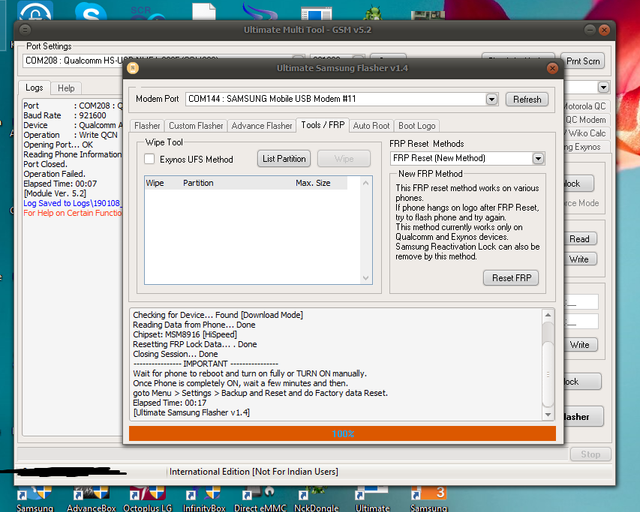
samsung j327vpp frp unlock done


Device: Samsung Device
Operation: Reset FRP (New Method)
Port: COM144 : SAMSUNG Mobile USB Modem #11
Checking for Device... Found [Download Mode]
Reading Data from Phone... Done
Chipset: MSM8916 [HiSpeed]
Resetting FRP Lock Data... . Done
Closing Session... Done
---------------- IMPORTANT ----------------
Wait for phone to reboot and turn on fully or TURN ON manually.
Once Phone is completely ON, wait a few minutes and then.
goto Menu > Settings > Backup and Reset and do Factory data Reset.
Elapsed Time: 00:17
[Ultimate Samsung Flasher v1.4]
11-05-25 12:55 #183
Administrator
Fast Unlocking
Join Date:
May 2025
Posts:
1,177
Thanks:
69
Reputation:
69 ★★☆☆☆
Trusted Member
Lg k 350tr frp, done
Port : COM49 : LGE Mobile USB Serial Port (COM49)
Baud Rate : 115200 - Auto
Device : LG *Automatic*
Operation : FRP Reset
Opening Port...OK
Reading Information...OK
Model : LG-K350TR
PID : CB41S161217005547
IMEI : 35799xxxxxxxxxx
Firmware : K35011b
Factory Ver. : LGK350TRAT-00-V10c-286-03-JUN-23-2016+0
LAF Ver. : 1.1
Chipset : mt6735
Operator : GLOBAL
Country : COM
Memory ID : H8G1e
Capacity : 7,28 GB
Battery : 50%
Reading Partition Table...OK
Resetting FRP Lock...Done
Rebooting Device...Done
Operation Finished.
Time taken: 00:05
[UltimateLG v0.4]
11-05-25 12:56 #184
Administrator
Fast Unlocking
Join Date:
May 2025
Posts:
1,177
Thanks:
69
Reputation:
69 ★★☆☆☆
Trusted Member
Create Bypass Firmware
Code:
Model    : Samsung Universal
Operation    : Create Bypass Firmware
Checking Combination Firmware...Done
Preparing Firmware File...Done
Saving Data...Done
Checking BL Firmware...Done
Saving Data...Done
Checking AP Firmware...Done
Saving Data...Done
Checking AP Firmware...Done
Saving Data...Done
Checking AP Firmare...Done
Saving Data...Done
Elapsed Time 04:33
Module Ver. 0.2
Flash ByPass Firmware
Code:
Model    : Samsung Universal
Operation    : Flash ByPass Firmware
Searching for Phone...Found
Port:     : COM13 : SAMSUNG Mobile USB Modem
Checking for Device...Found [Download Mode]
Reading Data from Phone...Done
Chipset    : LSI7580 [HiSpeed]
Loading Data...Done
Sending Data...Done
Closing Session...Done
Searching for Phone...Found
Port:     : COM13 : SAMSUNG Mobile USB Modem
Checking for Device...Found [Download Mode]
Reading Data from Phone...Done
Chipset    : LSI7580 [HiSpeed]
Loading Data...Done
Sending Data...Done
Loading Data...Done
Sending Data...Done
Loading Data...Done
Sending Data...Done
Loading Data...Done
Sending Data...Done
Closing Session...Done
Operation Finished.
Elapsed Time 03:29
Module Ver. 0.2
Backup Data Done :)
Restore Firmware Done :)
Code:
Model    : Samsung Universal
Operation    : Flash
Searching for Phone...Found
Port:     : COM186 : SAMSUNG Mobile USB Modem #63
Checking for Device...Found [Normal Mode]
Reading Phone Information...OK
Software:     : J700HXXS3BQE2/J700HXXSX3BQE2/J700HXXU3BQC2/J700HXXS3BQE2
Init Download Mode...OK
Waiting for phone in Download Mode...OK
Port:     : COM13 : SAMSUNG Mobile USB Modem
Reading Data from Phone...Done
Chipset    : LSI7580 [HiSpeed]
Sending Partition [BOOTLOADER]...Done
Sending Partition [CM]...Done
Sending Partition [BOOT]...Done
Sending Partition [RECOVERY]...Done
Sending Partition [SYSTEM]...Done
Sending Partition [RADIO]...Done
Sending Partition [CACHE]...Done
Sending Partition [HIDDEN]...Done
Closing Session...Done
Operation Finished.
Elapsed Time 02:38
Module Ver. 0.2
11-05-25 12:56 #185
Administrator
Fast Unlocking
Join Date:
May 2025
Posts:
1,177
Thanks:
69
Reputation:
69 ★★☆☆☆
Trusted Member
Port : COM7 : LGE Mobile USB Serial Port (COM7)
Baud Rate : 115200 - Auto
Device : LG *Automatic*
Operation : Write Firmware
Opening Port...OK
Reading Information...OK
Model : LG-D295f
PID : BR15S140820003160
IMEI : 355606061518432
Firmware : D295f10d
Factory Ver. : LGD295fAT-00-V10d-SCA-XX-AUG-27-2015+0
LAF Ver. : 1.0
Chipset : msm8610
Operator : GLOBAL
Country : COM
Memory ID : H4G1d
Capacity : 3,64 GB
Battery : 72%
Analyzing KDZ Firmware...
Loading DZ Firmware...Loaded 30 Partition(s)
Model : LG-D295
Version : D295f10d
Sector Size : 0x0000
Reading Partition Table...OK
Setting Parameters...Done
Formatting [userdata]...Done
Formatting [encrypt]...Done
Writing 01 of 30 [PrimaryGPT]...Done
Writing 02 of 30 [modem]...Done
Writing 03 of 30 [sbl1]...Done
Writing 04 of 30 [rpm]...Done
Writing 05 of 30 [tz]...Done
Writing 06 of 30 [sdi]...Done
Writing 07 of 30 [aboot]...Done
Writing 08 of 30 [rpmb]...Done
Writing 09 of 30 [tzb]...Done
Writing 10 of 30 [abootb]...Done
Writing 11 of 30 [persist]...Done
Writing 12 of 30 [laf]...Done
Writing 13 of 30 [boot]...Done
Writing 14 of 30 [recovery]...Done
Writing 15 of 30 [factory]...Done
Writing 16 of 30 [sbl1b]...Done
Writing 17 of 30 [cust]...Done
Writing 18 of 30 [system]...Done
Writing 19 of 30 [system]...Done
Writing 20 of 30 [system]...Done
Writing 21 of 30 [system]...Done
Writing 22 of 30 [system]...Done
Writing 23 of 30 [system]...Done
Writing 24 of 30 [system]...Done
Writing 25 of 30 [system]...Done
Writing 26 of 30 [system]...Done
Writing 27 of 30 [system]...Done
Writing 28 of 30 [system]...Done
Writing 29 of 30 [system]...Done
Writing 30 of 30 [BackupGPT]...Done
Reading Partition Table...OK
Formatting [mpt]...Done
Finalizing Parameters...Done
Rebooting Device...Done
Operation Finished.
Time taken: 04:15
[UltimateLG v0.4]
Log Saved to Logs\190202_141015.log



11-05-25 12:56 #186
Administrator
Fast Unlocking
Join Date:
May 2025
Posts:
1,177
Thanks:
69
Reputation:
69 ★★☆☆☆
Trusted Member
Code:
Operation    : Root Device
Checking for existing devices...Found
Port    : Qualcomm HS-USB QDLoader 9008 (COM54)
Driver Info    : Qualcomm Incorporated, qcusbser.sys, 2.1.2.7
Opening Port...OK
Init Handshake Sequence...OK
Hardware ID    : E1009600 [8909] 00000000
OPK_DATA    : 9CBA94693C2333A562BCF0E0E981C558748817D002F543B2A26AB1B4B3F1CF9E
Initializing Protocol...OK
Using Auto Loader Selection [2]
Preparing Loader...Done
Sending Loader [8909_012]...Done
Executing Loader...OK
Detecting Chip Type...OK
Hardware    : 8909, eMMC, 8 GB
LU Count    : 1 [0x00E90000] 
WARNING! High Speed Driver is not installed.
Please install driver from QcFire\Drivers folder using Device Manager.
Payload Info    : In: 65536 [4096], Out: 1048576, Sector Size: 512
Reading Partition Table...OK
Reading Device Information...OK
Device    : Vestel DynoLight [msm8909]
Software    : VDL371 release-keys, eng.buildserver.20161018.142914 [Tue Oct 18 14:31:46 EEST 2016]
Android Ver.    : 6.0.1
Patch Level    : 2016-10-01
Reading Data from Device...Done
Saving Backup...Done
Backup    : C:\UMTool\QcFire\Read\Vestel_DynoLight_VDL371 release-keys_2016-10-01\boot_org.qri
Preparing Data...Done
Injecting Root Script...Done
Patching Kernel...Done
Repacking Image...Done
Saving Root Image...Done
Root Image    : C:\UMTool\QcFire\Read\Vestel_DynoLight_VDL371 release-keys_2016-10-01\boot.qri
[COLOR="Red"]Writing Root Image...Done
[/COLOR]If phone hang on logo, or boot loop, just write boot_org.qri using [Flash QRI]
Operation Finished.
QcFire Ver. 3.7
11-05-25 12:56 #187
Administrator
Fast Unlocking
Join Date:
May 2025
Posts:
1,177
Thanks:
69
Reputation:
69 ★★☆☆☆
Trusted Member
Vivo Y81 1812 frp Remove Done
UMT FRP Tool Ver. 0.3


1)Fastboot Mode
2)Advanced options
3)“reboot adb”

Run UMT FRP Tool

Operation : Generic ADB FRP Reset
Searching for Device...Found
Brand : vivo
Model : vivo 1812
Product : k61v1_64_bsp
Device : 1812
Andriod Ver. : 8.1.0
Patch Level : 2018-11-05
Bootloader : unknown
Build ID : O11019 release-keys
Build Date : Tue Dec 18 16:34:57 CST 2018
Resetting FRP Lock...Done
Operation Finished.
UltimateFRP Ver. 0.3
11-05-25 12:56 #188
Administrator
Fast Unlocking
Join Date:
May 2025
Posts:
1,177
Thanks:
69
Reputation:
69 ★★☆☆☆
Trusted Member
ZTE Z799VL Frp Done!!!

Sale con la UMT - Gsm v5.2, solo entrar en modo Recovery y seleccionar la opción Apply update from ADB, aquí el Log de operaciones...

Port : ADB Sideload
Baud Rate : Not Appliicable
Device : ZTE Z799VL
Operation : FRP Reset
Searching for device in sideload mode... Found
Authorizing Device... Done
Resetting FRP Lock Data... Done
Please check phone screen and reboot phone.
Operation Finished.
Elapsed Time: 00:07
[Module Ver. 5.2]
Log Saved to Logs\190221_182757.log
11-05-25 12:57 #189
Administrator
Fast Unlocking
Join Date:
May 2025
Posts:
1,177
Thanks:
69
Reputation:
69 ★★☆☆☆
Trusted Member
Code:
Model    : [COLOR="Lime"]A7100[/COLOR]
Operation    : [COLOR="lime"]FRP Reset (Format UD)[/COLOR]
Searching for Phone...Found
Port:     : COM201 : SAMSUNG Mobile USB Modem #87
Checking for Device...Found [Normal Mode]
Reading Phone Information...OK
Model:     :[COLOR="lime"] SM-A7100[/COLOR]
IMEI:     : 35*********1
Software:     : [COLOR="lime"]A7100ZHU1AOL6/A7100ZZH1AOL6/A7100ZHU1AOL6/A7100ZHU1AOL6[/COLOR]
Product    : [COLOR="lime"]SM-A7100ZDATGY[/COLOR]
Init Download Mode...OK
Waiting for phone in Download Mode...OK
Port:     : COM10 : SAMSUNG Mobile USB Modem #3
Reading Data from Phone...Done
Chipset    : [COLOR="lime"]MSM8916 [HiSpeed][/COLOR]
Loading Data...Done
Sending Data...Done
Closing Session...Done
[COLOR="lime"]Operation Finished.[/COLOR]
Elapsed Time 00:55
Module Ver. 0.2
LOG Saved to !Logs\190222_092454.log


11-05-25 12:57 #190
Administrator
Fast Unlocking
Join Date:
May 2025
Posts:
1,177
Thanks:
69
Reputation:
69 ★★☆☆☆
Trusted Member
Xiaomi Redmi Note 5A FRP
Operation : Reset FRP
Checking for existing devices...Found
Port : Qualcomm HS-USB QDLoader 9008 (COM11)
Driver Info : Qualcomm Incorporated, qcusbser.sys, 2.1.2.2
Opening Port...OK
Init Handshake Sequence...OK
Hardware ID : E1600500 [8917] 00000000
OPK_DATA : 079E496E26A477B120DFCD85DF7E4AD067164D8292DDD37993 0D5891E3D8240B
Initializing Protocol...OK
Using Auto Loader Selection [1]
Preparing Loader...Done
Sending Loader [8917]...Done
Executing Loader...OK
Detecting Chip Type...OK
Hardware : 8917, eMMC, 16 GB
LU Count : 1 [0x01D5A000]
WARNING! High Speed Driver is not installed.
Please install driver from QcFire\Drivers folder using Device Manager.
Payload Info : In: 65536 [4096], Out: 1048576, Sector Size: 512
Reading Partition Table...OK
Reading Device Information...OK
Device : Xiaomi Redmi Note 5A [msm8937]
Software : N2G47H, V10.2.1.0.NDFMIXM [Fri Jan 18 23:18:58 WIB 2019]
Android Ver. : 7.1.2
Patch Level : 2018-12-01
Resetting FRP Lock......Done
Operation Finished.
QcFire Ver. 3.
11-05-25 12:57 #191
Administrator
Fast Unlocking
Join Date:
May 2025
Posts:
1,177
Thanks:
69
Reputation:
69 ★★☆☆☆
Trusted Member
Code:
Device    : [COLOR="Lime"]Xiaomi Redmi Note 3[/COLOR]
Operation    : [COLOR="lime"]Reset Mi Account[/COLOR]
Checking for existing devices...Found
Port    : Qualcomm HS-USB QDLoader 9008 (COM40)
Driver Info    : Qualcomm Incorporated, qu_usb_serial.sys, 2.1.2.0
Opening Port...OK
Init Handshake Sequence...OK
Hardware ID    : E1009B00 [8976] 00000000
OPK_DATA    : 079E496E26A477B120DFCD85DF7E4AD067164D8292DDD379930D5891E3D8240B
Initializing Protocol...OK
Using Auto Loader Selection [1]
Preparing Loader...Done
Sending Loader [8976_001]...Done
Executing Loader...OK
Detecting Chip Type...OK
Hardware    : 8976, eMMC, 32 GB
LU Count    : 1 [0x03A3E000] 
WARNING! High Speed Driver is not installed.
Please install driver from QcFire\Drivers folder using Device Manager.
Payload Info    : In: 65536 [4096], Out: 1048576, Sector Size: 512
Reading Partition Table...OK
Reading Device Information...OK
Device    : [COLOR="lime"]Xiaomi Redmi Note 3 [msm8952][/COLOR]
Software    : LMY47V, V7.4.9.0.LHOCNDD [Thu Jun 16 16:04:47 CST 2016]
Android Ver.    : [COLOR="lime"]5.1.1[/COLOR]
Patch Level    : [COLOR="Lime"]2016-06-01[/COLOR]
Resetting Mi Account Data...[COLOR="lime"]Done[/COLOR]
When phone is completely ON, connect to Internet and add Mi Account.
-------------- INFORMATION --------------
New Firmware may cause hang on logo.
In such case, you need to flash phone to recover.
Or downgrade firmware and try Reset Mi Account again.
Operation Finished.
QcFire Ver. 3.8


11-05-25 12:57 #192
Administrator
Fast Unlocking
Join Date:
May 2025
Posts:
1,177
Thanks:
69
Reputation:
69 ★★☆☆☆
Trusted Member
Vivo V9 remove pass code and remove FRP OK
Operation : Format FS
Checking for existing devices...Not Found
Turn Off phone, hold Vol UP + Vol DOWN and insert USB cable.
Some phones may need Special Boot Cable or TestPoint for EDL mode.
Found Port : Qualcomm HS-USB QDLoader 9008 (COM117)
Driver Info : Qualcomm Incorporated, qcusbser.sys, 2.1.2.7
Connecting to phone...OK
Waiting for response...OK
Init Handshake Sequence...OK
Hardware ID : E1600400 [8953] 00000000
OPK_DATA : 30315EBED1DD09CEAAE927CAE0EE967076BC178CA33718DB4F FF8F02A0E7FAD2
Initializing Protocol...OK
Using Auto Loader Selection [1]
Preparing Loader...Done
Sending Loader [8953_014]...Done
Executing Loader...OK
Detecting Chip Type...OK
Hardware : 8953, eMMC, 64 GB
LU Count : 1 [0x0747C000]
WARNING! High Speed Driver is not installed.
Please install driver from QcFire\Drivers folder using Device Manager.
Payload Info : In: 65536 [4096], Out: 1048576, Sector Size: 512
Reading Partition Table...OK
Reading Device Information...OK
Device : vivo vivo 1723
Software : OPM1.171019.011 release-keys, eng.compil.20181015.192928 [Mon Oct 15 19:29:28 CST 2018]
Android Ver. : 8.1.0
Patch Level : 2018-10-01
Preparing Data...Done
Formatting Userdata...Done
Resetting FRP Lock......Done
Operation Finished.
QcFire Ver. 3.8
11-05-25 12:57 #193
Administrator
Fast Unlocking
Join Date:
May 2025
Posts:
1,177
Thanks:
69
Reputation:
69 ★★☆☆☆
Trusted Member
Model : G570F
Operation : ADB Reset FRP
Searching for Device...Found
Brand : samsung
Model : SM-G570F
Product : on5xelte
Device : on5xelte
Andriod Ver. : 6.0.1
Patch Level : 2016-09-01
PDA : G570FXXU1APIB
Bootloader : G570FXXU1APIB
Build ID : MMB29K.G570FXXU1APIB
Build Date : Tue Sep 27 15:25:36 KST 2016
Checking Root Status...Done
Root : No Root
Resetting FRP Lock...Done
Operation Finished.
Elapsed Time 00:19
Module Ver. 0.2
LOG Saved to !Logs\190223_203503.log
11-05-25 12:58 #194
Administrator
Fast Unlocking
Join Date:
May 2025
Posts:
1,177
Thanks:
69
Reputation:
69 ★★☆☆☆
Trusted Member
Vivo Y91 formate done

Brand : Vivo
Model : Y91
Operation : Format FS
Waiting for Phone in BROM Mode...
Connect Power Off phone within 30 secs...
Port : PreLoader USB VCOM Port (COM132)
Connected to BROM.
Sending Download Agent...
connect DA end stage: 2, enable DRAM in 1st DA: 0
Connected to Download Agent..
Driver: MediaTek Inc., usbser.sys, 2.0.0.0
Syncing with Target...
Reading Partition Table...
Reading Device Information...
Brand : vivo
Manufacturer : vivo
Model : vivo 1816
Prod. Name : PD1818GF_EX
Device : PD1818GF_EX
Android Ver. : 8.1.0
Display ID : O11019 release-keys
Patch Level : 2019-01-05
Userdata is ENCRYPTED
Formatting userdata...
Format Done.
Disconnect Battery/Cable and Power On Phone.
[Ver. 1.8]
11-05-25 12:58 #195
Administrator
Fast Unlocking
Join Date:
May 2025
Posts:
1,177
Thanks:
69
Reputation:
69 ★★☆☆☆
Trusted Member
Nomi_i507 frp done
Operation : Reset FRP
CPU : MT6580
Storage : EMMC
DA : MTK_AllInOne_DA.bin [MTK_AllInOne_DA_v3.3001.2017-12-29.16:29]
Qt: Untested Windows version 6.2 detected!
Waiting for Phone in BROM Mode...
Connect Power Off phone within 30 secs...
Port : MediaTek PreLoader USB VCOM (Android) (COM5)
Connected to BROM.
Sending Download Agent...
connect DA end stage: 2, enable DRAM in 1st DA: 0
Connected to Download Agent..
Driver: MediaTek Inc., usb2ser.sys, 3.0.1504.0
Syncing with Target...
Reading Partition Table...
Reading Device Information...
Brand : Nomi_i507
Manufacturer : Nomi i507
Model : Nomi i507
Prod. Name : Nomi i507
Device : hct6580_weg_a_l
Platform : mt6580
Android Ver. : 5.1
Display ID : R06
Userdata is ENCRYPTED
Resetting FRP...
FRP Reset Done.
Disconnect Battery/Cable and Power On Phone.
[Ver. 1.8]
11-05-25 12:58 #196
Administrator
Fast Unlocking
Join Date:
May 2025
Posts:
1,177
Thanks:
69
Reputation:
69 ★★☆☆☆
Trusted Member
Xiaomi Redmi 5A Reset Mi Account done
Operation : Reset Mi Account
Checking for existing devices...Not Found
Turn Off phone, hold Vol UP + Vol DOWN and insert USB cable.
Some phones may need Special Boot Cable or TestPoint for EDL mode.
Found Port : Qualcomm HS-USB QDLoader 9008 (COM4)
Driver Info : Qualcomm Incorporated, qcusbser.sys, 2.1.2.0
Connecting to phone...OK
Waiting for response...OK
Init Handshake Sequence...OK
Hardware ID : E1600500 [8917] 00000000
OPK_DATA : 079E496E26A477B120DFCD85DF7E4AD067164D8292DDD37993 0D5891E3D8240B
Initializing Protocol...OK
Using Auto Loader Selection [1]
Preparing Loader...Done
Sending Loader [8917]...Done
Executing Loader...OK
Detecting Chip Type...OK
Hardware : 8917, eMMC, 16 GB
LU Count : 1 [0x01D1F000]
WARNING! High Speed Driver is not installed.
Please install driver from QcFire\Drivers folder using Device Manager.
Payload Info : In: 65536 [4096], Out: 1048576, Sector Size: 512
Reading Partition Table...OK
Reading Device Information...OK
Device : Xiaomi Redmi 5A [msm8937]
Software : CUSTOMER_VERSION_riva, V10.1.2.0.OCKMIFI [Mon Dec 10 20:39:32 WIB 2018]
Android Ver. : 8.1.0
Patch Level : 2018-11-01
Resetting Mi Account Data...Done
Preparing Data...Done
Formatting Userdata...Done
When phone is completely ON, connect to Internet and add Mi Account.
-------------- INFORMATION --------------
New Firmware may cause hang on logo.
In such case, you need to flash phone to recover.
Or downgrade firmware and try Reset Mi Account again.
Operation Finished.
QcFire Ver. 3.9
11-05-25 12:58 #197
Administrator
Fast Unlocking
Join Date:
May 2025
Posts:
1,177
Thanks:
69
Reputation:
69 ★★☆☆☆
Trusted Member
Oppo F1F Net Unlock dOne

Port : COM224 : OPPO HS-USB MSM Diagnostics 276C (COM224)
Baud Rate : 921600
Device : Oppo F1
Operation : Network/Region Unlock
Opening Port...
Reading Information... OK
Compile : Nov 25 2017 11:44:45
Release : Jul 03 2017 01:00:00
Hw Ver. : FAAAANUZ
Build : MPSS.DPM.2.0.2.c1.10-00065-M8936FAAAANUZM-1.101619.1.105555.1_VENDOR
IMEI[1]
IMEI[2]
Unlocking Phone... Done
Please reboot phone now.
Operation Finished.
Elapsed Time: 00:05
[Module Ver. 5.2]
11-05-25 12:58 #198
Administrator
Fast Unlocking
Join Date:
May 2025
Posts:
1,177
Thanks:
69
Reputation:
69 ★★☆☆☆
Trusted Member
Brand : Infinix
Model : Smart 2 HD (X609)
Operation : Reset FRP
Waiting for Phone in BROM Mode...
Connect Power Off phone within 30 secs...
Port : MediaTek PreLoader USB VCOM (Android) (COM47)
Connected to BROM.
Sending Download Agent...
connect DA end stage: 2, enable DRAM in 1st DA: 0
Connected to Download Agent..
Driver: MediaTek Inc., usb2ser.sys, 3.0.1504.0
Syncing with Target...
Reading Partition Table...
Reading Device Information...
Brand : Infinix
Manufacturer : INFINIX MOBILITY LIMITED
Model : Infinix X609
Prod. Name : H8025
Device : Infinix-X609
Android Ver. : 8.1.0
Display ID : X609-H8025AB-GO-181227V149
Patch Level : 2019-01-05
Userdata is ENCRYPTED
Resetting FRP...
FRP Reset Done.
Disconnect Battery/Cable and Power On Phone.
[Ver. 1.8]
11-05-25 12:58 #199
Administrator
Fast Unlocking
Join Date:
May 2025
Posts:
1,177
Thanks:
69
Reputation:
69 ★★☆☆☆
Trusted Member
Code:
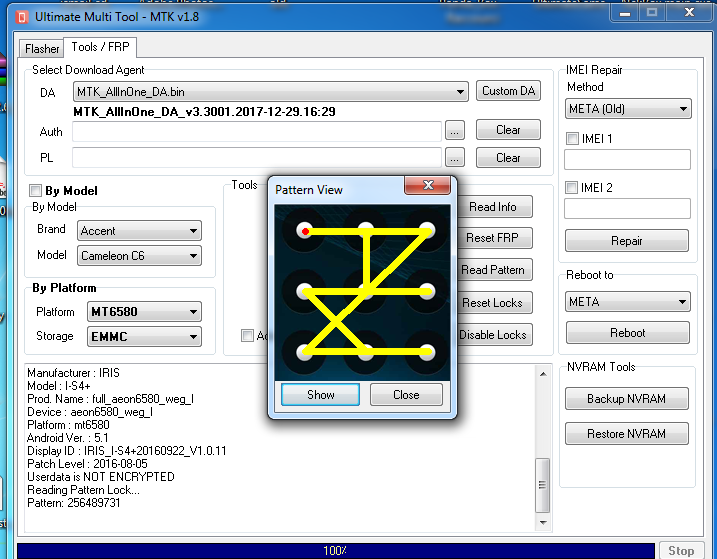
Operation : Read Pattern
CPU : MT6580
Storage : EMMC
DA : MTK_AllInOne_DA.bin [MTK_AllInOne_DA_v3.3001.2017-12-29.16:29]
Waiting for Phone in BROM Mode...
Connect Power Off phone within 30 secs...
Port : MediaTek PreLoader USB VCOM (Android) (COM72)
Connected to BROM.
Sending Download Agent...
connect DA end stage: 2, enable DRAM in 1st DA: 0
Connected to Download Agent..
Driver: MediaTek Inc., usb2ser.sys, 3.0.1504.0
Syncing with Target...
Reading Partition Table...
Reading Device Information...
Brand : IRIS
Manufacturer : IRIS
Model : I-S4+
Prod. Name : full_aeon6580_weg_l
Device : aeon6580_weg_l
Platform : mt6580
Android Ver. : 5.1
Display ID : IRIS_I-S4+20160922_V1.0.11
Patch Level : 2016-08-05
Userdata is NOT ENCRYPTED
Reading Pattern Lock...
Pattern: 256489731
Read Pattern Done.
Disconnect Battery/Cable and Power On Phone.
[Ver. 1.8]
11-05-25 12:59 #200
Administrator
Fast Unlocking
Join Date:
May 2025
Posts:
1,177
Thanks:
69
Reputation:
69 ★★☆☆☆
Trusted Member
G928f frp done
Model : G928T
Operation : FRP Reset (Format UD)
Searching for Phone...Found
Port: : COM844 : SAMSUNG Mobile USB Modem #149
Checking for Device...Found [Normal Mode]
Reading Phone Information...OK
Model: : SM-G928F
IMEI: : 990005849015210
Software: : G928FXXS3BQB1/G928FXXS3BQB1/G928PVPS2A3/G928FXXS3BQB1
Product : XXXXXXXXXXXSPR
Init Download Mode...OK
Waiting for phone in Download Mode...OK
Port: : COM503 : SAMSUNG Mobile USB Modem #5
Reading Data from Phone...Done
Chipset : LSI7420 [HiSpeed]
Loading Data...Done
Sending Data...Done
Closing Session...Done
Operation Finished.
Elapsed Time 00:43
Module Ver. 0.2
LOG Saved to !Logs\190409_143654.log
Join NCK Forum — it's free
  • ✔ Ask questions and get answers from experienced technicians
  • ✔ Download files and attachments
  • ✔ Follow official NCK, UMT and Avengers updates
  • ✔ Mark solutions and earn reputation
836 members · 0 solved problems · 6 posts this week
Register now
Page 10 of 25<8910111220>Last »