★★★★★ Post Here All Successfully Repaired Phones by Ultimate Multi Tool ★★★★★

Please log in to view member profiles.
Sticky: ★★★★★ Post Here All Successfully Repaired Phones by Ultimate Multi Tool ★★★★★
12-05-25 12:57 #361
Administrator
Fast Unlocking
Join Date:
May 2025
Posts:
1,177
Thanks:
69
Reputation:
6 ☆☆☆☆☆
New Member
Vivo Y91i pattern remove done
Quote:
Operation : MTK One Click
Hold VOL UP + DOWN and connect USB Cable.
Some phone may have different key combination for BROM mode.
Waiting for device in BROM mode...
Port: COM6
Port Name: MediaTek PreLoader USB VCOM (Android) (COM6)
Path: \\?\usb#vid_0e8d&pid_2000#6&186afa3&0&2#{86e0d1e0-8089-11d0-9ce4-08003e301f73}
Preloader Mode Detected, Trying to crash...
- Success!
Port: COM5
Port Name: MediaTek USB Port (COM5)
Path: \\?\usb#vid_0e8d&pid_0003#6&186afa3&0&2#{86e0d1e0-8089-11d0-9ce4-08003e301f73}
Chipset: 0x0766, [MT6765]
Hardware Info: 0x8A00, 0xCA00, 0x00
SecureBoot: True
SLA: False
DA Auth: True
Disabling WatchDog...
- Success
Sending Payload data...
- Payload sent
Initiating Control Transfer...
- Done
Waiting for result...
Disable Auth Success
DA : MTK_AllInOne_DA.bin
Waiting for Phone in Flash Mode...
Connect Power Off phone within 30 secs...
Port : MediaTek USB Port (COM5)
Connected to BROM.
Sending Download Agent...
connect DA end stage: 2, enable DRAM in 1st DA: 0
Connected to Download Agent..
Syncing with Target...
Reading Partition Table...
Storage : eMMC
Reading Device Information...
Brand : vivo
Manufacturer : vivo
Model : vivo 1820
Prod. Name : PD1818HF_EX
Device : PD1818HF_EX
Build Date : Mon Jan 18 15:49:40 CST 2021
Build Flavor : full_k62v1_64_bsp-user
Build Desc. : full_k62v1_64_bsp-user 8.1.0 O11019 1610956190 release-keys
Android Ver. : 8.1.0
Display ID : O11019 release-keys
Patch Level : 2021-01-01
Board : k62v1_64_bsp
Platform : mt6765
Board : k62v1_64_bsp
Platform : mt6765
Userdata is ENCRYPTED
Formatting Userdata...
- Success!
Seeking FRP Data...
Resetting FRP...
- Success!
Disconnect Battery/Cable and Power On Phone.
[UltimateMTK Ver. 4.3]
12-05-25 12:57 #362
Administrator
Fast Unlocking
Join Date:
May 2025
Posts:
1,177
Thanks:
69
Reputation:
6 ☆☆☆☆☆
New Member
Vivo Y91i pattern remove done
Quote:
Operation : MTK One Click
Hold VOL UP + DOWN and connect USB Cable.
Some phone may have different key combination for BROM mode.
Waiting for device in BROM mode...
Port: COM6
Port Name: MediaTek PreLoader USB VCOM (Android) (COM6)
Path: \\?\usb#vid_0e8d&pid_2000#6&186afa3&0&2#{86e0d1e0-8089-11d0-9ce4-08003e301f73}
Preloader Mode Detected, Trying to crash...
- Success!
Port: COM5
Port Name: MediaTek USB Port (COM5)
Path: \\?\usb#vid_0e8d&pid_0003#6&186afa3&0&2#{86e0d1e0-8089-11d0-9ce4-08003e301f73}
Chipset: 0x0766, [MT6765]
Hardware Info: 0x8A00, 0xCA00, 0x00
SecureBoot: True
SLA: False
DA Auth: True
Disabling WatchDog...
- Success
Sending Payload data...
- Payload sent
Initiating Control Transfer...
- Done
Waiting for result...
Disable Auth Success
DA : MTK_AllInOne_DA.bin
Waiting for Phone in Flash Mode...
Connect Power Off phone within 30 secs...
Port : MediaTek USB Port (COM5)
Connected to BROM.
Sending Download Agent...
connect DA end stage: 2, enable DRAM in 1st DA: 0
Connected to Download Agent..
Syncing with Target...
Reading Partition Table...
Storage : eMMC
Reading Device Information...
Brand : vivo
Manufacturer : vivo
Model : vivo 1820
Prod. Name : PD1818HF_EX
Device : PD1818HF_EX
Build Date : Mon Jan 18 15:49:40 CST 2021
Build Flavor : full_k62v1_64_bsp-user
Build Desc. : full_k62v1_64_bsp-user 8.1.0 O11019 1610956190 release-keys
Android Ver. : 8.1.0
Display ID : O11019 release-keys
Patch Level : 2021-01-01
Board : k62v1_64_bsp
Platform : mt6765
Board : k62v1_64_bsp
Platform : mt6765
Userdata is ENCRYPTED
Formatting Userdata...
- Success!
Seeking FRP Data...
Resetting FRP...
- Success!
Disconnect Battery/Cable and Power On Phone.
[UltimateMTK Ver. 4.3]
12-05-25 12:57 #363
Administrator
Fast Unlocking
Join Date:
May 2025
Posts:
1,177
Thanks:
69
Reputation:
6 ☆☆☆☆☆
New Member
Infinix Smart HD 2021 FS & FRP Done in 1 Click
Code:
Operation : MTK One Click
Hold VOL UP + DOWN and connect USB Cable.
Some phone may have different key combination for BROM mode.
Waiting for device in BROM mode...
Port: COM51
Port Name: MediaTek PreLoader USB VCOM (Android) (COM51)
Path: \\?\usb#vid_0e8d&pid_2000#5&7dd9323&0&1#{86e0d1e0-8089-11d0-9ce4-08003e301f73}
Preloader Mode Detected, Trying to crash...
- Success!
Port: COM52
Port Name: MediaTek USB Port (COM52)
Path: \\?\usb#vid_0e8d&pid_0003#5&7dd9323&0&1#{86e0d1e0-8089-11d0-9ce4-08003e301f73}
Chipset: 0x0717, [MT6761]
Hardware Info: 0x8A00, 0xCA01, 0x200
SecureBoot: False
SLA: False
DA Auth: False
Disabling WatchDog...
- Success
Sending Payload data...
- Payload sent
Initiating Control Transfer...
- Done
Waiting for result...
Disable Auth Success
Preloader saved as : preloader_infinix_x612b_210906_101409.bin
DA : MTK_AllInOne_DA.bin
Waiting for Phone in Flash Mode...
Connect Power Off phone within 30 secs...
Port : MediaTek USB Port (COM52)
Connected to BROM.
Sending Download Agent...
connect DA end stage: 2, enable DRAM in 1st DA: 0
Connected to Download Agent..
Syncing with Target...
Reading Partition Table...
Storage : eMMC
Reading Device Information...
Build Date : Fri Jan 15 23:30:07 CST 2021
Build Flavor : X612B-GL-user
Build Desc. : X612B-GL-user 10 QP1A.190711.020 BC-GL-210115V023 release-keys
Android Ver. : 10
Display ID : X612B-X612BBC-QGo-GL-210115V023
Patch Level : 2020-12-05
Userdata is ENCRYPTED
Formatting Userdata...
- Success!
Seeking FRP Data...
Resetting FRP...
- Success!
Disconnect Battery/Cable and Power On Phone.
[UltimateMTK Ver. 4.4]
12-05-25 12:58 #364
Administrator
Fast Unlocking
Join Date:
May 2025
Posts:
1,177
Thanks:
69
Reputation:
6 ☆☆☆☆☆
New Member
samsung a025f frp done with great Umt Qcfire


Device : Samsung Galaxy A02s (SM-A025F)
Operation : Reset FRP
Checking for existing devices...Found
Port : Qualcomm HS-USB QDLoader 9008 (COM15)
Driver Info : Qualcomm Incorporated, qcusbser.sys, 2.1.0.3
Opening Port...OK
Init Handshake Sequence...OK
Hardware ID : E1A00900 [8953] 00002000
OPK_DATA : 98431A976541787E851B78549BBDA354E64C343814B5A8618B B79571EF8267A5
Initializing Protocol...OK
Using Auto Loader Selection [1]
Preparing Loader...Done
Sending Loader [8953_051]...Done
Executing Loader...OK
Detecting Chip Type...OK
Hardware : 8953, EMMC, 64 GB
LU Count : 1 [0x0747C000]
WARNING! High Speed Driver is not installed.
Please install driver from QcFire\Drivers folder using Device Manager.
Payload Info : In: 65536 [4096], Out: 1048576, Sector Size: 512
Reading Partition Table...OK
Reading Device Information...Failed
Resetting FRP Lock......Done
Operation Finished.
QcFire Ver. 7.2
12-05-25 12:58 #365
Administrator
Fast Unlocking
Join Date:
May 2025
Posts:
1,177
Thanks:
69
Reputation:
6 ☆☆☆☆☆
New Member
J810F frp done
Code:
Model : Samsung
Operation : FRP Bypass [Open YouTube]
Searching for Phone...Found
Port: : COM59 : SAMSUNG Mobile USB Modem #20
Checking for Device...Found [Normal Mode]
Reading Phone Information...OK
Model: : SM-J810F
IMEI: : 35**********
Software: : J810FJXU4CUC1/J810FOJM4CUC1/J810FXXU4CUA1/J810FJXU4CUC1
Product : ***
Open link on phone and continue bypass.
Elapsed Time 51:59
[UltimateSams v0.3]
12-05-25 12:58 #366
Administrator
Fast Unlocking
Join Date:
May 2025
Posts:
1,177
Thanks:
69
Reputation:
6 ☆☆☆☆☆
New Member
Operation : MTK One Click
Hold VOL UP + DOWN and connect USB Cable.
Some phone may have different key combination for BROM mode.
Waiting for device in BROM mode...
Port: COM455
Port Name: MediaTek USB Port (COM455)
Path: \\?\usb#vid_0e8d&pid_0003#5&32a310c1&0&2#{86e0d1e0-8089-11d0-9ce4-08003e301f73}
Chipset: 0x0707, [MT6768]
Hardware Info: 0x8A00, 0xCA00, 0x00
SecureBoot: True
SLA: False
DA Auth: True
Disabling WatchDog...
- Success
Sending Payload data...
- Payload sent
Initiating Control Transfer...
- Done
Waiting for result...
Disable Auth Success
Preloader saved as : preloader_ke7_h693_210905_175835.bin
DA : MTK_AllInOne_DA.bin
Waiting for Phone in Flash Mode...
Connect Power Off phone within 30 secs...
Port : MediaTek USB Port (COM455)
Connected to BROM.
Sending Download Agent...
connect DA end stage: 2, enable DRAM in 1st DA: 0
Connected to Download Agent..
Syncing with Target...
Reading Partition Table...
Storage : eMMC
Reading Device Information...
Unable to read!
Userdata is ENCRYPTED
Seeking FRP Data...
Resetting FRP...
- Success!
Disconnect Battery/Cable and Power On Phone.
[UltimateMTK Ver. 4.4]
12-05-25 12:58 #367
Administrator
Fast Unlocking
Join Date:
May 2025
Posts:
1,177
Thanks:
69
Reputation:
6 ☆☆☆☆☆
New Member
Brand : E-Tachi
Model : A5 Slim
Operation : Reset FRP
Connection Mode : Preloader
Waiting for Phone in Flash Mode...
Connect Power Off phone within 30 secs...
Port : MediaTek PreLoader USB VCOM (Android) (COM456)
Connected to BROM.
Sending Download Agent...
connect DA end stage: 2, enable DRAM in 1st DA: 0
Connected to Download Agent..
Syncing with Target...
Reading Partition Table...
Storage : eMMC
Reading Device Information...
Brand : E-TACHI
Manufacturer : Joyar
Model : A5SLIM
Prod. Name : A5SLIM
Device : A5SLIM
Build Date : Sat Jul 27 09:34:41 CST 2019
Build Flavor : A5SLIM-user
Build Desc. : A5SLIM-user 8.1.0 O11019 1564191285 release-keys
Android Ver. : 8.1.0
Display ID : E-tachi_A5SLIM_V.10_20190727
Patch Level : 2019-07-05
Board : A5SLIM
Platform : mt6580
Userdata is ENCRYPTED
Resetting FRP...
FRP Reset Done.
Disconnect Battery/Cable and Power On Phone.
[UltimateMTK Ver. 4.4]
12-05-25 12:58 #368
Administrator
Fast Unlocking
Join Date:
May 2025
Posts:
1,177
Thanks:
69
Reputation:
6 ☆☆☆☆☆
New Member
A015F frp done
Code:
Model : Samsung
Operation : FRP Bypass [Open YouTube]
Searching for Phone...Found
Port: : COM61 : SAMSUNG Mobile USB Modem #21
Checking for Device...Found [Normal Mode]
Reading Phone Information...OK
Model: : SM-A015F
IMEI: : 35************
Software: : A015FXXS3ATL1/A015FOJM3ATI2/A015FXXS3ATL2/A015FXXS3ATL1
Product : MID
Open link on phone and continue bypass.
Elapsed Time 02:41
[UltimateSams v0.3]
12-05-25 12:58 #369
Administrator
Fast Unlocking
Join Date:
May 2025
Posts:
1,177
Thanks:
69
Reputation:
6 ☆☆☆☆☆
New Member
oppo a71 user lock reset done
Device : Oppo A71 (CPH1801)
Operation : Format FS
Checking for existing devices...Not Found
Turn Off phone, hold Vol UP + Vol DOWN and insert USB cable.
Some phones may need Special Boot Cable or TestPoint for EDL mode.
Found Port : Qualcomm HS-USB QDLoader 9008 (COM6)
Driver Info : Qualcomm Incorporated, qcusbser.sys, 2.1.2.7
Connecting to phone...OK
Waiting for response...OK
Init Handshake Sequence...OK
Hardware ID : E1A00900 [8953] 00000000
OPK_DATA : 557BAC65705B8A8303276B9FBB8FD533DBB33EA9E55BF80B47 647B8549C170B9
Initializing Protocol...OK
Using Auto Loader Selection [1]
Preparing Loader...Done
Sending Loader [8953_015]...Done
Executing Loader...OK
Formatting Userdata...Done
Disconnect phone and hold Power Button to reset.
Operation Finished.
QcFire Ver. 7.2
12-05-25 12:59 #370
Administrator
Fast Unlocking
Join Date:
May 2025
Posts:
1,177
Thanks:
69
Reputation:
6 ☆☆☆☆☆
New Member
ZTE ZMax Pro Frp

Code:
Device : ZTE ZMax Pro (Z981)
Operation : Reset FRP
Checking for existing devices...Found
Port : Qualcomm HS-USB QDLoader 9008 (COM20)
Driver Info : Qualcomm Incorporated, qcusbser.sys, 2.1.2.7
Opening Port...OK
Init Handshake Sequence...OK
Hardware ID : E1209700 [8952] 00000400
OPK_DATA : 5662CAD0CFCCC2090245A6E87006CBAAECF28FAE81C62246BCC25820C5146F8E
Initializing Protocol...OK
Using Auto Loader Selection [1]
Preparing Loader...Done
Sending Loader [8952_017]...Done
Executing Loader...OK
Detecting Chip Type...OK
Hardware : 8952, EMMC, 32 GB
LU Count : 1 [0x03A3E000]
WARNING! High Speed Driver is not installed.
Please install driver from QcFire\Drivers folder using Device Manager.
Payload Info : In: 65536 [4096], Out: 1048576, Sector Size: 512
Reading Partition Table...OK
Reading Device Information...OK
Device : ZTE Z981 [msm8952] [urd]
Brand : ZTE
Prod.Name : P895T20_MPCS
Software : Z981V1.0.0B21, 20170802.130758 [Wed Aug 2 13:21:42 CST 2017]
Android Ver. : 6.0.1
Patch Level : 2017-08-01
Resetting FRP Lock......Done
Operation Finished.
QcFire Ver. 7.3
12-05-25 12:59 #371
Administrator
Fast Unlocking
Join Date:
May 2025
Posts:
1,177
Thanks:
69
Reputation:
6 ☆☆☆☆☆
New Member
Vivo S1 Pro Format & Frp
Code:
Device : Vivo S1 Pro (PD1945F)
Operation : Format FS 2 (Vivo)
Checking for existing devices...Found
Port : Qualcomm HS-USB QDLoader 9008 (COM47)
Driver Info : Qualcomm Incorporated, qcusbser.sys, 2.1.2.7
Opening Port...OK
Init Handshake Sequence...OK
Hardware ID : E1A01000 [SDM665] 03007300
OPK_DATA : F754F13EE91BF54295CA1FBD64D182067440B35FC41B798A539670EA259771BA
Initializing Protocol...OK
Using Auto Loader Selection [1]
Preparing Loader...Done
Sending Loader [SDM665_001]...Done
Executing Loader...OK
Detecting Chip Type...OK
Hardware : SDM665, UFS, 128 GB
LU Count : 6 [0x01D81800] [0x00000800] [0x00000800] [0x00004000] [0x00040000] [0x00004000]
WARNING! High Speed Driver is not installed.
Please install driver from QcFire\Drivers folder using Device Manager.
Payload Info : In: 65536 [65536], Out: 16384, Sector Size: 4096
Reading Partition Table...OK
Reading Device Information...OK
Software : , eng.compil.20210901.105305 [Wed Sep 1 10:53:05 CST 2021]
Android Ver. : 11
Patch Level : 2021-09-01
Preparing Data...Done
Formatting Userdata......Done
Resetting FRP Lock.......Done
Operation Finished.
QcFire Ver. 7.3
12-05-25 12:59 #372
Administrator
Fast Unlocking
Join Date:
May 2025
Posts:
1,177
Thanks:
69
Reputation:
6 ☆☆☆☆☆
New Member
Redmi 9A frp done
Code:
Operation : MTK One Click
Hold VOL UP + DOWN and connect USB Cable.
Some phone may have different key combination for BROM mode.
Waiting for device in BROM mode...
Port: COM7
Port Name: MediaTek USB Port_V1633 (COM7)
Path: \\?\usb#vid_0e8d&pid_0003#6&3b2e6861&2&1#{86e0d1e0-8089-11d0-9ce4-08003e301f73}
Chipset: 0x0766, [MT6765]
Hardware Info: 0x8A00, 0xCA00, 0x00
SecureBoot: True
SLA: True
DA Auth: True
Disabling WatchDog...
- Success
Sending Payload data...
- Payload sent
Initiating Control Transfer...
- Done
Waiting for result...
Disable Auth Success
Preloader saved as : preloader_k62v1_64_bsp_211111_155956.bin
DA : MTK_AllInOne_DA.bin
Waiting for Phone in Flash Mode...
Connect Power Off phone within 30 secs...
Port : MediaTek USB Port_V1633 (COM7)
Connected to BROM.
Sending Download Agent...
connect DA end stage: 2, enable DRAM in 1st DA: 0
Connected to Download Agent..
Executing Flashing Task...
Syncing with Target...
Reading Partition Table...
Storage : eMMC
Reading Device Information...
Unable to read!
Userdata is ENCRYPTED
Seeking FRP Data...
Resetting FRP...
- Success!
Disconnect Battery/Cable and Power On Phone.
[UltimateMTK Ver. 4.4]
12-05-25 12:59 #373
Administrator
Fast Unlocking
Join Date:
May 2025
Posts:
1,177
Thanks:
69
Reputation:
6 ☆☆☆☆☆
New Member
We_F10 frp done
Code:
Operation : Reset FRP
CPU : MT6580
Storage : EMMC
DA : MTK_AllInOne_DA.bin [MTK_AllInOne_DA_v3.3001.01/21/2021.12:51]
Waiting for Phone in Flash Mode...
Connect Power Off phone within 30 secs...
Port : MediaTek PreLoader USB VCOM_V1633 (Android) (COM18)
Connected to BROM.
Sending Download Agent...
connect DA end stage: 2, enable DRAM in 1st DA: 0
Connected to Download Agent..
Syncing with Target...
Reading Partition Table...
Storage : eMMC
Reading Device Information...
Brand : WE
Manufacturer : Vanzo
Model : WE F10
Prod. Name : WE_F10
Device : WE_F10
Build Date : Wed Sep 19 21:00:52 CST 2018
Build Flavor : mt6580o_we613b_h31a-f10_xlj_cc_64gbitp8d3_go_wcdma_mul
Build Desc. : full_we613b-user 8.1.0 O11019 20180919 release-keys
Android Ver. : 8.1.0
Display ID : WE_F10_HW1_SW10
Patch Level : 2018-09-05
Platform : mt6580
Userdata is ENCRYPTED
Resetting FRP...
FRP Reset Done.
Disconnect Battery/Cable and Power On Phone.
[UltimateMTK Ver. 4.4]
12-05-25 12:59 #374
Administrator
Fast Unlocking
Join Date:
May 2025
Posts:
1,177
Thanks:
69
Reputation:
6 ☆☆☆☆☆
New Member
Oppo A16 user lock & frp reset done
Operation : MTK One Click
Hold VOL UP + DOWN and connect USB Cable.
Some phone may have different key combination for BROM mode.
Waiting for device in BROM mode...
Port: COM6 [MediaTek USB Port_V1632 (COM6)]
Device Path: \\?\usb#vid_0e8d&pid_0003#5&1e6a4af9&0&2#{86e0d1e0-8089-11d0-9ce4-08003e301f73}
Chipset: 0x0766, [MT6765] [Helio P35/G35]
Hardware Info: 0x8A00, 0xCA00, 0x00
Config : [SecureBoot: True] [SLA: False] [DA Auth: True]
Preparing device...
-- Success!
Preloader saved as : preloader_oppo6765_211114_174732.bin
DA : MTK_AllInOne_DA.bin
Waiting for Phone in Flash Mode...
Connect Power Off phone within 30 secs...
Port : MediaTek USB Port_V1632 (COM6)
Connected to BROM.
Sending Download Agent...
connect DA end stage: 2, enable DRAM in 1st DA: 0
Connected to Download Agent..
Syncing with Target...
Reading Partition Table...
Storage : eMMC
Reading Information...
Build Date : Fri Jul 23 03:14:34 CST 2021
Build Flavor : sys_oplus_mssi_64_cn-user
Build Desc. : sys_oplus_mssi_64_cn-user 11 RP1A.200720.011 1626980523742 release-keys
Android Ver. : 11
Display ID : RP1A.200720.011 release-keys
Patch Level : 2021-08-05
Platform : MT6765
Board : oppo6765
Platform : mt6765
Userdata is ENCRYPTED
Formatting Userdata...
- Success!
Seeking FRP Data...
Resetting FRP...
- Success!
Disconnect Battery/Cable and Power On Phone.
[UltimateMTK Ver. 4.5]
12-05-25 13:00 #375
Administrator
Fast Unlocking
Join Date:
May 2025
Posts:
1,177
Thanks:
69
Reputation:
6 ☆☆☆☆☆
New Member
Samsung E1200Y dead recover done by write dump file via King UMT

12-05-25 13:00 #376
Administrator
Fast Unlocking
Join Date:
May 2025
Posts:
1,177
Thanks:
69
Reputation:
6 ☆☆☆☆☆
New Member
Device : Huawei Y7 Prime 2019 (LDN-L21)
Operation : Reset FRP
Checking for existing devices...Not Found
Turn Off phone, hold Vol UP + Vol DOWN and insert USB cable.
Some phones may need Special Boot Cable or TestPoint for EDL mode.
Found Port : Qualcomm HS-USB QDLoader 9008 (COM469)
Driver Info : Network Connect, qcusbser.sys, 3.0.0.0
Connecting to phone...OK
Waiting for response...OK
Init Handshake Sequence...OK
Hardware ID : E1F00400 [8937] 41001500
OPK_DATA : 3B48AE9023196AE5C8162BCE65CB66E9636C784CB52A55046D 15110FD8B11688
Initializing Protocol...OK
Using Auto Loader Selection [1]
Preparing Loader...Done
Sending Loader [8937_034]...Done
Executing Loader...OK
Hardware : 8937, EMMC, 32 GB
LU Count : 3 [0x03A3E000] [0x00002000] [0x00002000]
WARNING! High Speed Driver is not installed.
Please install driver from QcFire\Drivers folder using Device Manager.
Payload Info : In: 262144 [4096], Out: 16384, Sector Size: 512
Reading Partition Table...OK
Reading Device Information...OK
Device : unknown
Software : System 8.0.0.073(09YO), eng.root.20201027.024155 [Tue Oct 27 02:41:55 CST 2020]
Android Ver. : 8.0.0
Patch Level : 2020-09-01
Resetting FRP Lock.......Done
Operation Finished.
QcFire Ver. 7.4
12-05-25 13:00 #377
Administrator
Fast Unlocking
Join Date:
May 2025
Posts:
1,177
Thanks:
69
Reputation:
6 ☆☆☆☆☆
New Member
samsung A12 FRP in 1clic

Operation : MTK One Click
Hold VOL UP + DOWN and connect USB Cable.
Some phone may have different key combination for BROM mode.
Waiting for device in BROM mode...
Port: COM22 [MediaTek USB Port_V1632 (COM22)]
Device Path: \\?\usb#vid_0e8d&pid_0003#6&3999aca5&0&5#{86e0d1e0-8089-11d0-9ce4-08003e301f73}
Chipset: 0x0766, [MT6765] [Helio P35/G35]
Hardware Info: 0x8A00, 0xCA00, 0x00
Config : [SecureBoot: True] [SLA: False] [DA Auth: True]
MEID: F2669FBB146EACC388665C85300B6623
Preparing device...
-- Success!
Preloader saved as : preloader_k65v1_64_bsp_titan_rat_220112_175211.bin
DA : MTK_AllInOne_DA.bin
Waiting for Phone in Flash Mode...
Connect Power Off phone within 30 secs...
Port : MediaTek USB Port_V1632 (COM22)
Connected to BROM.
Sending Download Agent...
connect DA end stage: 2, enable DRAM in 1st DA: 0
Connected to Download Agent..
Syncing with Target...
Reading Partition Table...
Storage : eMMC
Reading Information...
Build Date : Tue Jul 27 14:10:03 KST 2021
Build Flavor : a12ucs-user
Build Desc. : a12ucs-user 11 RP1A.200720.012 A125WVLU2AUG5 release-keys
Android Ver. : 11
Display ID : RP1A.200720.012.A125WVLU2AUG5
Patch Level : 2021-07-01
Platform : MT6765
Board : k65v1_64_bsp_titan_rat
Platform : mt6765
Userdata is ENCRYPTED
Seeking FRP Data...
- Resetting FRP...
- Success!
- Resetting FRP...
- Success!
Resetting FRP...
- Success!
Disconnect Battery/Cable and Power On Phone.
[UltimateMTK Ver. 4.8]
12-05-25 13:00 #378
Administrator
Fast Unlocking
Join Date:
May 2025
Posts:
1,177
Thanks:
69
Reputation:
6 ☆☆☆☆☆
New Member
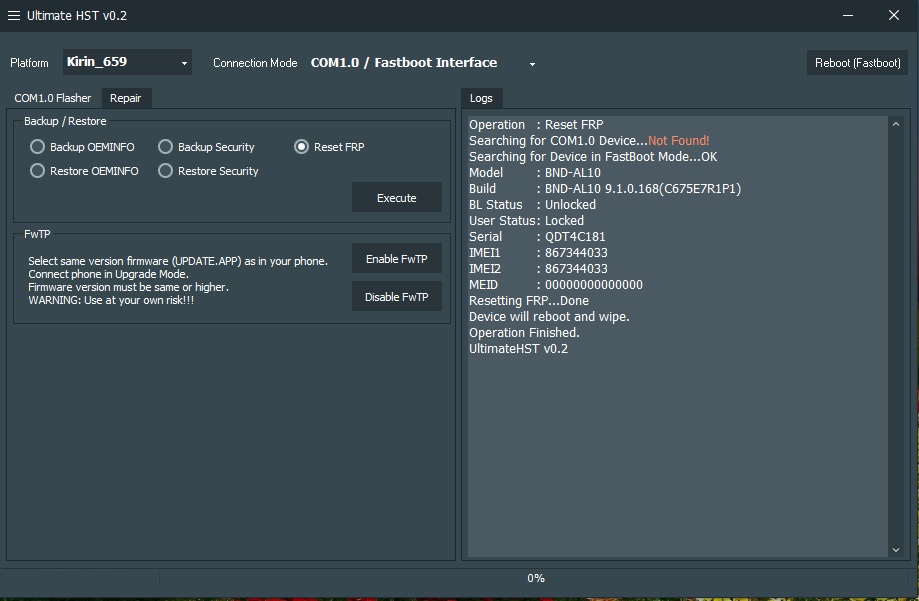
Honor 7X (BND AL10) FRP done in single click

12-05-25 13:01 #379
Administrator
Fast Unlocking
Join Date:
May 2025
Posts:
1,177
Thanks:
69
Reputation:
6 ☆☆☆☆☆
New Member
Redmi 9C FRP done

Code:
Operation : Reset FRP
Waiting for Device...Found
Port : MediaTek USB Port_V1633 (COM7)
Device Path : \\?\usb#vid_0e8d&pid_0003#6&3b2e6861&2&1#{a5dcbf10-6530-11d2-901f-00c04fb951ed}
Driver : MediaTek Inc., 3.0.1504.0 [usb2ser.sys]
Mode : BROM
Hw ID : MT6765 [0766] Helio P35/G35
Details : 8A00,CA00,0000
Sec. Config : [SBA:True] [SLA:True] [DAA:True]
MEID : 88E1B7BCA9DB33BEF466A1D7BC7A0229
SoC ID[0] : 403A291F5D792F839F528B750814CFA1
SoC ID[1] : C506FEE8278FDEBDC6A3A132B2C6A63B
Running Exploit...Done
Downloading Preloader...OK
Saved as : preloader_k65v1_64_bsp.bin
Loading EMI Config from Preloader...OK
Sec. Config : [SBA:False] [SLA:False] [DAA:False]
Using DA : MTK_AllInOne_DA.bin
DA Security Patched
Sending 1st DA...OK
Jump DA Address...OK
Syncing...OK
Checksum Level is Storage
Connection : brom
Speed : HIGH-SPEED
Reading RAM Configuration...OK
Reading EMI Configuration...OK
CID : 150100424A54443452094F9660937855 [EMMC]
Initializing Storage...OK
Sending 2nd DA...OK
Initialize DA Extension...OK
Int. RAM : 0x000000000003A000 [232.00 KB]
Ext. RAM : 0x0000000080000000 [2.00 GB]
Flash ID : BJTD4R
CID : 150100424A54443452094F9660937855
BOOT1 : 0x0000000000400000 [4.00 MB]
BOOT2 : 0x0000000000400000 [4.00 MB]
RPMB : 0x0000000000400000 [4.00 MB]
USERAREA : 0x0000000747C00000 [29.12 GB]
Connected to High-Speed DA Port
Reading Partition Table...OK
Manuf. : Xiaomi
Ven. Model : M2006C3MG
Platform : mt6765
Ven. Date : Tue Sep 27 15:44:08 CST 2022
Ver. Inc. : V12.0.15.0.QCRTRXM
Resetting FRP...OK
Operation Finished.
[UltimateMTK2 v0.2]
12-05-25 13:01 #380
Administrator
Fast Unlocking
Join Date:
May 2025
Posts:
1,177
Thanks:
69
Reputation:
6 ☆☆☆☆☆
New Member
Vivo U20 PIN and FRP Done with UMT QFIRE!
Device : Vivo U20
Operation : Format FS 2 (Vivo)
Checking for existing devices...Not Found
Turn Off phone, hold Vol UP + Vol DOWN and insert USB cable.
Some phones may need Special Boot Cable or TestPoint for EDL mode.
Found Port
Driver Info : HS Corporation, ghsser.sys, 10.2104.1.2
Connecting to phone...OK
Waiting for response...OK
Init Handshake Sequence...OK
Hardware ID : E1500900 [SM6150] 03007300
OPK_DATA : F754F13EE91BF54295CA1FBD64D182067440B35FC41B798A53 9670EA259771BA
Initializing Protocol...OK
Using Pre-Defined Loader [U20.ufl]
Preparing Loader...Done
Sending Loader [U20]...Done
Executing Loader...OK
Detecting Storage Type...OK
Hardware : SM6150, UFS, 128 GB
LU Count : 6 [0x01D83800] [0x00000800] [0x00000800] [0x00002000] [0x00040000] [0x00004000]
Payload Info : In: 262144 [65536], Out: 16384, Sector Size: 4096
Reading Partition Table...OK
Reading Device Information...OK
Device : vivo vivo 1921 [PD1941F_EX]
Brand : vivo
Prod.Name : PD1941F_EX
Software : PKQ1.190302.001 release-keys, compiler09221650 [Wed Sep 22 16:49:58 CST 2021]
Android Ver. : 9
Patch Level : 2021-09-01
Preparing Data...Done
Formatting Userdata......Done
Resetting FRP Lock.......Done
Operation Finished.
Device : Vivo U20
Operation : Format FS 2 (Vivo)
Checking for existing devices...Not Found
Turn Off phone, hold Vol UP + Vol DOWN and insert USB cable.
Some phones may need Special Boot Cable or TestPoint for EDL mode.
Found Port
Driver Info : HS Corporation, ghsser.sys, 10.2104.1.2
Connecting to phone...OK
Waiting for response...OK
Init Handshake Sequence...OK
Hardware ID : E1500900 [SM6150] 03007300
OPK_DATA : F754F13EE91BF54295CA1FBD64D182067440B35FC41B798A53 9670EA259771BA
Initializing Protocol...OK
Using Pre-Defined Loader [U20.ufl]
Preparing Loader...Done
Sending Loader [U20]...Done
Executing Loader...OK
Detecting Storage Type...OK
Hardware : SM6150, UFS, 128 GB
LU Count : 6 [0x01D83800] [0x00000800] [0x00000800] [0x00002000] [0x00040000] [0x00004000]
Payload Info : In: 262144 [65536], Out: 16384, Sector Size: 4096
Reading Partition Table...OK
Reading Device Information...OK
Device : vivo vivo 1921 [PD1941F_EX]
Brand : vivo
Prod.Name : PD1941F_EX
Software : PKQ1.190302.001 release-keys, compiler09221650 [Wed Sep 22 16:49:58 CST 2021]
Android Ver. : 9
Patch Level : 2021-09-01
Preparing Data...Done
Formatting Userdata......Done
Resetting FRP Lock.......Done
Operation Finished.
QcFire Ver. 8.4
Currently Active Users Viewing This Thread: 2
0 members and 2 guests
No members right now.
Join NCK Forum — it's free
  • ✔ Ask questions and get answers from experienced technicians
  • ✔ Download files and attachments
  • ✔ Follow official NCK, UMT and Avengers updates
  • ✔ Mark solutions and earn reputation
842 members · 0 solved problems · 6 posts this week
Register now
Page 19 of 25<1718192021>Last »